Comparison
Brother SE1900 vs SE2000: what the Wi-Fi model adds
Published
Short answer
The SE2000 keeps the SE1900's 5 x 7 inch embroidery field, 8 included feet and similar stitch count, and adds wireless LAN transfer, Artspira app support, a larger 3.7 inch screen with fuller on-screen editing, Advanced Color Sort and jump stitch trimming, plus more built-in designs and fonts. Buy the SE2000 if you embroider often and want less trimming and cable shuffling; the SE1900 does the same size work for less.
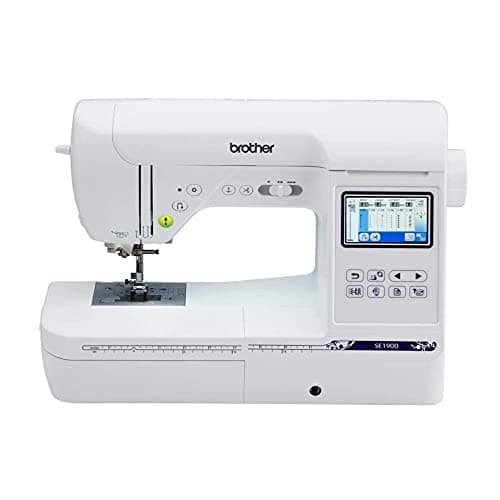
Brother
Brother SE1900: 5x7 combo with 240 stitches
See price on Amazon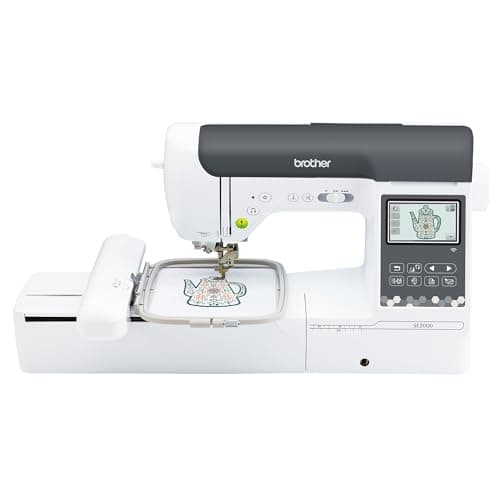
Brother
Brother SE2000, 5 x 7 in field with Wi-Fi
See price on Amazon
- Brother SE1900: 5x7 combo with 240 stitches
- Built-in designs
- 138 designs, 11 fonts
- Screen
- 3.2 inch color LCD touchscreen
- Brother SE2000, 5 x 7 in field with Wi-Fi
- Built-in designs
- 190+ (plus 50 downloadable)
- Screen
- 3.7 in LCD touchscreen
| Pick | Built-in designs | Screen | Price | Link |
|---|---|---|---|---|
| Brother SE1900: 5x7 combo with 240 stitches | 138 designs, 11 fonts | 3.2 inch color LCD touchscreen | - | Amazon |
| Brother SE2000, 5 x 7 in field with Wi-Fi | 190+ (plus 50 downloadable) | 3.7 in LCD touchscreen | - | Amazon |
Facts are taken from each Amazon listing. Prices are checked daily and shown with their date.
Verdict
Buy the Brother SE2000 if you embroider often and want wireless transfer, color sort and automatic jump stitch trimming. Buy the SE1900 if you only need the same 5 x 7 inch field and are fine trimming threads and moving files by USB.
The Brother SE2000 is the newer sibling of the SE1900, and both are 5 x 7 inch sewing and embroidery combos. This page is for buyers who have settled on that hoop size and now need to know whether the SE2000's extras are worth paying for. It sets the two listings side by side, explains what each added feature does in practice, lists what is identical, and ends with a clear pick for each type of user. Every spec comes from the Amazon listings; anything a listing does not state is marked as such.
Spec comparison from the listings
Start with what matters most for embroidery: field size, how designs get to the machine, and what the machine does for you while stitching. The table sticks to the listing text.
Maximum embroidery field
- Brother SE1900
- 5 x 7 in
- Brother SE2000
- 5 x 7 in
Built-in embroidery designs
- Brother SE1900
- 138
- Brother SE2000
- Over 190, plus 50 downloadable
Embroidery fonts
- Brother SE1900
- 11
- Brother SE2000
- 13
Built-in sewing stitches
- Brother SE1900
- 240
- Brother SE2000
- 241
Touchscreen
- Brother SE1900
- 3.2 in color LCD
- Brother SE2000
- 3.7 in LCD
Wireless LAN
- Brother SE1900
- Not stated
- Brother SE2000
- Yes
USB port
- Brother SE1900
- Not stated
- Brother SE2000
- Yes
Artspira app
- Brother SE1900
- Not stated
- Brother SE2000
- Yes
Advanced Color Sort
- Brother SE1900
- Not stated
- Brother SE2000
- Yes
Jump stitch trimming
- Brother SE1900
- Not stated
- Brother SE2000
- Yes
Sewing feet included
- Brother SE1900
- 8
- Brother SE2000
- 8
| Feature | Brother SE1900 | Brother SE2000 |
|---|---|---|
| Maximum embroidery field | 5 x 7 in | 5 x 7 in |
| Built-in embroidery designs | 138 | Over 190, plus 50 downloadable |
| Embroidery fonts | 11 | 13 |
| Built-in sewing stitches | 240 | 241 |
| Touchscreen | 3.2 in color LCD | 3.7 in LCD |
| Wireless LAN | Not stated | Yes |
| USB port | Not stated | Yes |
| Artspira app | Not stated | Yes |
| Advanced Color Sort | Not stated | Yes |
| Jump stitch trimming | Not stated | Yes |
| Sewing feet included | 8 | 8 |
What stays the same
Both machines list a 5 x 7 inch embroidery field with an included hoop and 8 sewing feet. That means the largest design you can stitch in one hooping is the same on both. If design size is your main worry, either machine solves it; our hoop size chart shows how 5 x 7 compares to other fields.
Sewing ability is also nearly identical on paper: 240 stitches on the SE1900 and 241 on the SE2000. Both are computerized combo machines where you slide on the embroidery arm for hooped work and remove it for regular sewing. Thread, stabilizer and needle choices are the same for both, so the stabilizer chart and embroidery needle guide apply equally.
Wireless transfer and the Artspira app
The SE2000 listing states wireless LAN, with designs sent from a PC through Brother's free Design Database Transfer software, plus a built-in USB port. It also works with the Artspira mobile app, which the listing says gives access to 50 free designs and lets you draw custom patterns on a phone and send them to the machine.
In daily use this removes a step. Instead of copying a file to a USB stick, walking it to the machine and loading it, you send it from where you already are. If you buy designs regularly, that convenience adds up. The SE1900 listing does not claim wireless transfer, so plan on a wired route.
Color sort and jump stitch trimming
These two features save the most time at the machine. Advanced Color Sort reorders the colors when you combine several designs on screen, so each thread color is stitched once rather than several times. Fewer color changes means fewer stops to rethread.
Jump stitch trimming cuts the thread that would otherwise run across the fabric when the machine moves from one area of the design to another. Without it you trim those jump threads by hand after stitching, which is slow on lettering and multi-part designs. The SE2000 listing states both features; the SE1900 listing does not mention either.
Note.Trimming jump threads by hand is safe but slow. Use small curved embroidery scissors and cut close without nicking the fabric or the stitches.
Screen and on-machine editing
The SE2000 lists a 3.7 inch screen and spells out on-screen editing: letter editing, enhanced zoom, resizing, rotating, repositioning and combining designs. The SE1900 lists a 3.2 inch color touchscreen for previewing designs and browsing editing options.
A bigger screen and fuller editing matter most when you add names to designs or build layouts at the machine instead of in software. If you plan to do your layout work on a computer, this gap matters less.
Who should buy which
Choose the SE2000 if you embroider every week, stitch a lot of lettering or combined designs, or want to send designs from a phone or computer without cables. Color sort and jump stitch trimming cut the fiddly work between and after runs.
Choose the SE1900 if you want the 5 x 7 field at a lower outlay and do not mind trimming jump threads and moving files by USB. It stitches the same size designs. If you are still unsure about hoop size, compare it to the 4 x 4 SE700 in our SE700 vs SE1900 page, or browse the best Brother embroidery machines.
Frequently asked questions
Is the SE2000 hoop bigger than the SE1900? No. Both listings state a 5 x 7 inch embroidery field, so the largest single design is the same.
Can I add Wi-Fi to an SE1900? The SE1900 listing does not mention wireless transfer. Plan on moving designs by USB or cable, or choose the SE2000 if wireless matters to you.
Is the SE2000 worth it for a beginner? If you expect to embroider often, the time savers make learning less tedious. If you are testing whether you like embroidery, a lower-cost machine from our beginner embroidery guide is a sensible start.
Do both machines sew regular seams? Yes. Both are sewing and embroidery combos with 240 or more built-in sewing stitches, used with the embroidery arm removed.
What you need for this
- See price on AmazonAmazon
Brother SE2000, 5 x 7 in field with Wi-Fi
From Best Brother embroidery machines: PE, SE, Innov-is and PR compared
 See price on AmazonAmazon
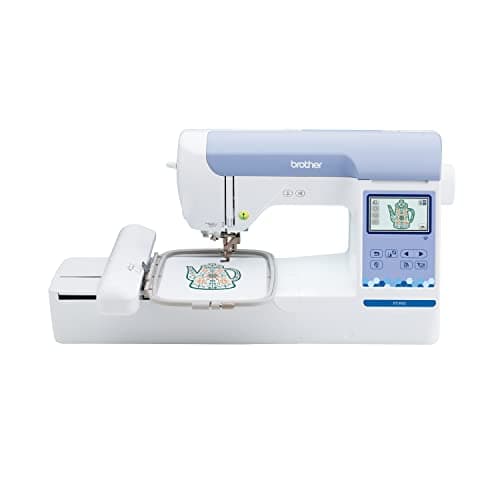
Brother PE900: 5x7 field, wireless, 193 designs